
Most small business owners think SEO is something you bolt onto a website after it's built, like a coat of paint. That's exactly the misconception that keeps contractors, cleaners, and beauty professionals buried on page two of Google. Understanding what is on page SEO web design means recognizing that your site's structure, content, and technical setup all work together from day one. When these elements are aligned, your website doesn't just look good — it actively pulls in calls, bookings, and new customers from search.
Table of Contents
- What is on-page SEO and why web design matters
- Key on-page SEO design elements for local service businesses
- Local business schema: boosting visibility with structured data
- Aligning content strategy and user experience with on-page SEO web design
- Summarizing on-page SEO web design best practices for local businesses
- Why many local businesses overlook the true power of on-page SEO web design
- Partner with Lead Machine Web Design to boost your local SEO and leads
- Frequently asked questions
Key Takeaways
| Point | Details |
|---|---|
| On-page SEO basics | On-page SEO involves optimizing content, HTML, and user experience directly on your web pages to boost search rankings. |
| Design supports SEO | Mobile-friendly, clear, and fast-loading web design enhances your SEO by improving user engagement and crawlability. |
| Local business schema | Implementing accurate LocalBusiness schema markup helps your business info show correctly in local search results. |
| Content clarity | Matching headlines, content, and CTAs to user intent builds trust and improves conversions from search traffic. |
| Professional help benefits | Expert web design firms can align on-page SEO with local business goals for maximum lead generation. |
What is on-page SEO and why web design matters
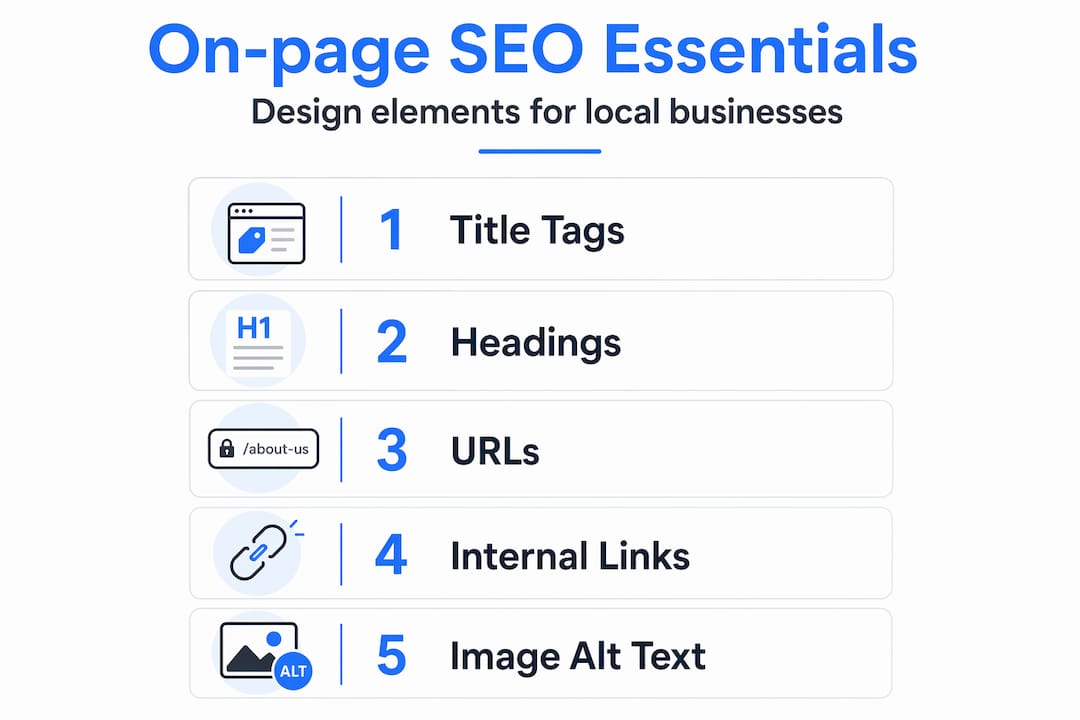
On-page SEO is the set of optimizations applied directly on individual web pages to improve rankings and usability. That includes title tags, meta descriptions, headings, URL structure, internal links, image optimization, and page experience. These are not invisible technical tricks. They are built into how your website is designed and structured from the ground up.
Here's the connection most business owners miss: well-designed sites are easier for search engines to crawl and understand. A cluttered, confusing website layout doesn't just frustrate visitors. It also confuses Google's crawlers, which means your pages rank lower even if your content is solid.
For a local service business, this matters in a very direct way. When a homeowner searches "roof repair near me" or "lash extensions in Austin," Google scans the structure of your pages to decide if your site is the right answer. A clear, well-organized website helps Google match your business to those searches.
Key on-page SEO elements that connect directly to web design for lead generation:
- Title tags that tell Google exactly what each page is about
- Meta descriptions that give searchers a reason to click
- Heading structure (H1, H2, H3) that organizes your content logically
- Clean URLs that describe the page content
- Internal links that connect related pages across your site
- Optimized images with descriptive filenames and alt text
- Fast loading speed and mobile-friendly layout
Key on-page SEO design elements for local service businesses
Understanding the core elements of on-page SEO in design helps you make informed decisions when building or updating your website. Let's break down each one in practical terms.
Title tags and meta descriptions are what show up in Google search results. Each page needs its own unique title and description. A plumber's homepage title might read "Plumber in Denver | Fast Emergency Repairs" rather than just "Home." That specificity tells Google and the searcher exactly what to expect.

Heading structure is how you organize your page content. Use one H1 heading per page, and it should include your main keyword. Subheadings (H2, H3) break content into readable sections. Think of it like a well-organized service menu at a restaurant. Customers can scan it quickly and find what they need.
URL structure matters more than most people realize. A URL like "yoursite.com/bathroom-remodeling-phoenixis far more useful thanyoursite.com/page?id=47`. Clean, descriptive URLs help both users and search engines understand what the page covers before they even click.
Internal linking connects your pages together. If your homepage mentions bathroom remodeling, link that phrase to your dedicated bathroom remodeling page. This keeps visitors on your site longer and helps Google understand which pages are most important.
Image optimization is often skipped entirely. Rename your image files from something like IMG_4832.jpg to kitchen-remodel-dallas.jpg before uploading. Add alt text that describes the image. This helps with accessibility and gives Google more context about your page content.
On-page SEO elements like title tags, meta descriptions, headings, URL structure, internal linking, and image optimization help search engines understand your page. A mobile-first design with simple navigation and fast performance supports conversions for local service websites.
Pro Tip: Test your site on your phone right now. If you have to pinch to zoom, scroll sideways, or wait more than three seconds for it to load, you're losing leads every single day.
| On-page element | What to do | Why it matters |
|---|---|---|
| Title tag | Include city and service | Matches local search queries |
| Meta description | Write a clear benefit statement | Improves click-through rate |
| H1 heading | One per page, include keyword | Tells Google the page topic |
| URL slug | Use words, not numbers | Easier to read and rank |
| Image alt text | Describe the image clearly | Supports accessibility and SEO |
| Page speed | Compress images, minimize code | Reduces bounce rate |
Explore effective web design strategies that combine these elements into a site built to rank and convert.
Local business schema: boosting visibility with structured data
Now that you understand on-page SEO basics and design elements, let's explore how structured data specifically enhances local business visibility.
Schema markup is a block of code you add to your website that tells Google specific facts about your business in a format it can read instantly. For local service businesses, the most important type is LocalBusiness schema. LocalBusiness schema helps Google understand core business details like your name, address, phone number, and hours, which enhances your local search presence.
Here's how to implement it correctly:
- Create one JSON-LD LocalBusiness schema block per location page. If you have one location, it goes on your homepage or contact page. Multiple locations each get their own dedicated page with their own schema block.
- Match your NAP exactly. NAP stands for Name, Address, Phone. The information in your schema must match your Google Business Profile word for word. NAP formatting must exactly match your Google Business Profile to avoid errors that confuse search engines.
- Use 24-hour formatting for opening hours. Google recommends this format in the
openingHoursSpecificationfield. So instead of "9am to 5pm," you'd use09:00to17:00. - Include your service types. You can list specific services within your schema, which helps Google connect your business to more specific searches.
- Keep it updated. If your hours change seasonally or you add a new service area, update your schema immediately. Stale schema can create conflicting signals that hurt your rankings.
Schema markup supports and reinforces your Google Business Profile data. It does not replace it. Think of them as two separate signals that confirm the same facts, which builds trust with Google.
Pro Tip: Use Google's free Rich Results Test tool to check whether your schema is implemented correctly. It takes two minutes and shows you exactly what Google sees when it reads your page.
When schema is set up correctly, your business listing in search results can show star ratings, operating hours, and service areas directly in the results page, before anyone even clicks your link. That visibility is a real advantage for local SEO web design.
Aligning content strategy and user experience with on-page SEO web design
Content strategy is the bridge between on-page SEO technical setup and real user engagement, making your web design work harder for your business.
Here's a mistake that costs local businesses real money: building one generic "Services" page that lists everything from roof repairs to gutter cleaning to window washing. Each of those services deserves its own page. A dedicated page for "gutter cleaning in Nashville" can rank for that specific search. A catch-all services page almost never will.
On-page SEO is about clarity for humans and crawlers. Your page must clearly match the visitor's search intent to succeed. That means your H1 heading, your opening paragraph, and your call to action all need to deliver exactly what the page title promises.
A common failure is when the page's headline or hero section overpromises and the content doesn't deliver, damaging trust and conversions. If your headline says "Same-day service available" but your booking form has a 72-hour lead time, you've already lost the customer.
Here's what a well-structured service page looks like in practice:
- H1 heading includes the service and location ("Kitchen Remodeling in Sacramento")
- Opening paragraph confirms what the page is about and who it's for
- Subheadings break down the process, benefits, and FAQs
- Images show real work with descriptive alt text
- CTA button appears above the fold and again at the bottom ("Call Now for a Free Quote")
- Trust signals like reviews, licenses, or years in business appear near the CTA
Fast loading and mobile usability reduce friction. If a page takes five seconds to load on a phone, most visitors leave before they even read your headline. That's a bounce, and enough of them tell Google your page isn't worth ranking.
Pro Tip: Write your CTA button text from the customer's perspective. "Get My Free Estimate" converts better than "Submit" because it tells the visitor exactly what they're getting.
Find on-page SEO content tips that help local service pages rank and convert at the same time.
Summarizing on-page SEO web design best practices for local businesses
Let's consolidate everything into a clear framework local businesses can follow when designing or improving their website for SEO.
On-page SEO, off-page SEO, and technical SEO must work together to maximize your website's search engine performance. On-page is your foundation. Everything else builds on it.
| SEO element | Web design action | Business benefit |
|---|---|---|
| Title tags | Write unique titles per page | Higher click-through from search |
| Heading structure | Use H1 per page, H2 for sections | Better readability and keyword signals |
| LocalBusiness schema | Add JSON-LD to location pages | Rich results and local visibility |
| Mobile design | Build with mobile-first layout | Lower bounce rate, higher rankings |
| Page speed | Compress images, reduce plugins | More visitors stay and convert |
| Internal links | Connect service pages to each other | Stronger site authority |
| CTA placement | Above the fold and end of page | More calls and form submissions |
Consistency across your schema, Google Business Profile, and website content is what builds a trusted local search presence over time. These aren't one-time fixes. They are ongoing practices that compound in value.
Explore web design and SEO integration to see how these elements come together in a site built for local lead generation.
Why many local businesses overlook the true power of on-page SEO web design
Most local business owners who come to us have the same story. They paid someone to build a website, it looked great at launch, and then nothing happened. No calls. No form submissions. Just a pretty digital brochure sitting on the internet.
The reason is almost always the same: the site was designed for appearance, not for search or conversion. SEO was treated as a checklist. Someone added a keyword here, a meta description there, and called it done. But on-page SEO is less about tricks and more about clarity and matching user intent for both people and crawlers.
The businesses that win local search aren't necessarily the ones with the flashiest websites. They're the ones whose pages clearly answer the question a customer just typed into Google. Their content is specific. Their structure is clean. Their CTAs are obvious. Their schema is accurate.
Here's what most articles won't tell you: the biggest gains in on-page SEO for local service businesses come from content specificity, not technical tweaks. Creating a dedicated page for each service in each city you serve, writing it for a real customer with a real problem, and making it easy to contact you — that combination outperforms any keyword stuffing or meta tag trick every single time.
The investment that moves the needle is content quality and user experience. Not more plugins. Not a fancier font. Real clarity about who you serve, what you do, and why someone should call you today.
Explore on-page SEO deeper insights to understand how this thinking applies to your specific business type.
Partner with Lead Machine Web Design to boost your local SEO and leads
If you've made it this far, you already understand more about on-page SEO web design than most of your competitors. The next step is putting it into practice on a website built specifically to generate leads for your local service business.
At Lead Machine Web Design, we build websites that generate leads for contractors, beauty professionals, cleaners, landscapers, and other local service providers. Every site we build includes proper heading structure, schema markup, mobile-first design, fast load times, and clear CTAs designed to get your phone ringing. We even provide a free mockup before any development begins, so you can see the strategy before you commit. If your current website isn't bringing in consistent leads, let's change that.
Frequently asked questions
What is on-page SEO in web design?
On-page SEO in web design involves optimizing individual web pages through content, HTML elements, and site structure to improve search rankings and user experience. On-page SEO is the set of optimizations applied directly on webpages to improve rankings and usability.
How does LocalBusiness schema help my service business?
LocalBusiness schema provides structured data about your business details, helping search engines display rich results and confirm your location and hours consistently. LocalBusiness schema helps Google understand core business details like name, address, phone, and hours.
Why is mobile-friendly design important for on-page SEO?
Mobile-friendly design improves user experience on smartphones and is a direct Google ranking factor because of mobile-first indexing. Mobile-friendly design is critical for SEO, as Google uses mobile-first indexing to evaluate and rank pages.
Can I do on-page SEO myself or should I hire a professional?
Basic optimizations like writing better title tags or adding alt text to images can be done yourself. Professional help ensures correct schema implementation, proper page structure, and a design built to convert visitors into paying customers.
How often should I update my website's on-page SEO?
Update your on-page SEO any time you change services, add locations, or adjust business hours. Maintaining LocalBusiness schema means keeping it updated and error-free whenever services or hours change, since outdated information can hurt your local rankings.