
Most local service websites have the same problem. They look decent, maybe even professional, but they sit there quietly while potential customers leave without calling, booking, or filling out a form. If you run a landscaping company, a cleaning service, or a beauty salon, your website is either your best salesperson or a missed opportunity. Understanding the design service business website process from start to finish is what separates a site that generates leads from one that just takes up space online. This guide walks you through every stage, built specifically for home improvement and beauty service providers.
Table of Contents
- Understanding the design process for service business websites
- Preparing your website project: goal setting and strategy planning
- Executing design and development: from messaging to launch
- Optimizing lead generation: layout, CTAs, and local trust signals
- Testing and maintaining your website for ongoing success
- Why strict process discipline is the secret to website success for local service providers
- Get expert help with your service business website
- Frequently asked questions
Key Takeaways
| Point | Details |
|---|---|
| Follow a clear process | Using a structured five-step website design process builds sites that convert visitors into leads. |
| Plan strategy first | Defining goals and planning technology, sitemap, and content upfront prevents delays and scope creep. |
| Prioritize messaging | Writing final copy before design ensures your site speaks directly to customers and supports conversions. |
| Optimize for mobile | Fast load times and easy-to-use mobile features like click-to-call significantly reduce bounce and increase leads. |
| Use dedicated service pages | Individual pages detailing services with clear CTAs and local trust signals greatly improve local lead generation. |
Understanding the design process for service business websites
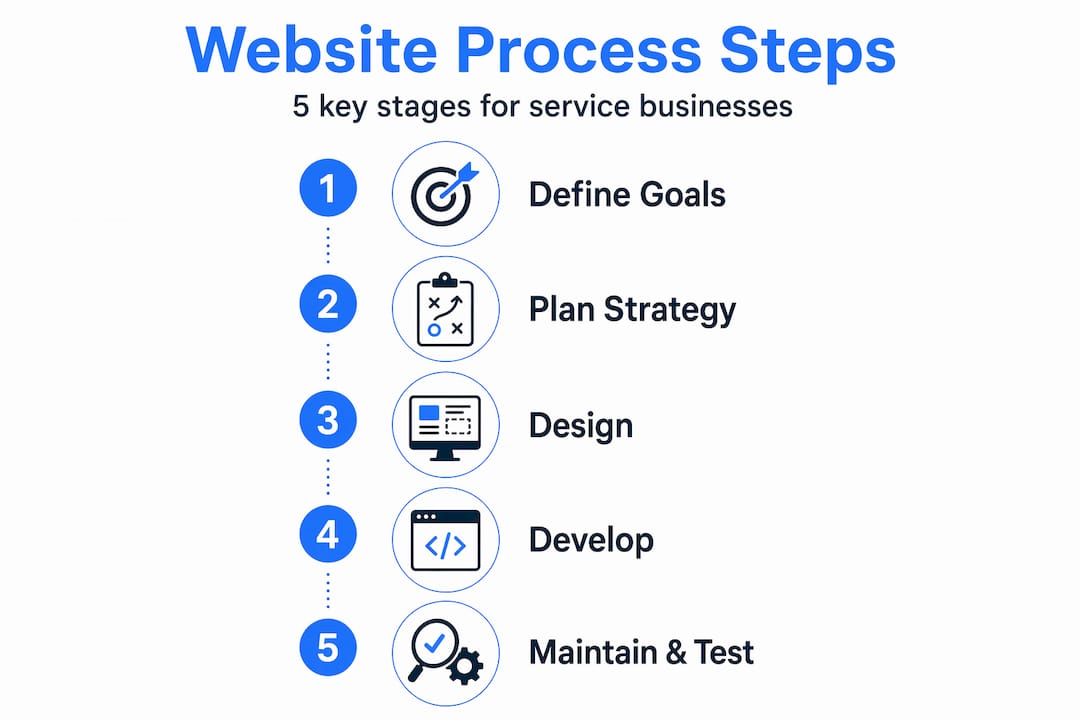
To start building an effective website, understanding the standard professional design process is essential. A 5-step web design process includes defining goals, planning strategy, design and development, testing, and launch plus maintenance to build a site that converts. Each step builds on the last. Skip one and you will feel the consequences later, usually in the form of wasted money, a confusing site, or a launch that never happens.
Here is what each stage covers for a service business:
- Goal definition — Decide what the site must accomplish. For most local service providers, this means generating leads on websites through calls, form submissions, and booking requests.
- Strategy and planning — Map out your pages, your audience, and your messaging before any design begins.
- Design and development — Build the visual and technical structure of the site with your brand and your customers in mind.
- Testing — Check everything: forms, speed, mobile display, and browser compatibility.
- Launch and maintenance — Go live and keep the site updated so it stays effective over time.
The table below shows how each stage connects to a specific business outcome for local service providers:
| Stage | Key activity | Business outcome |
|---|---|---|
| Goal definition | Set measurable lead targets | Focused design decisions |
| Strategy and planning | Audience research, sitemap | Relevant content, better SEO |
| Design and development | Brand visuals, copy, coding | Professional, converting site |
| Testing | Performance and usability checks | Fewer lost leads from errors |
| Launch and maintenance | Go live, ongoing updates | Sustained lead generation |
Every stage matters. But the two most underestimated are goal definition and maintenance. Most local businesses rush the first and skip the last entirely.
Preparing your website project: goal setting and strategy planning
With a clear understanding of the overall process, now let's prepare your project with focused goal-setting and strategic planning. Strategic planning with realistic timelines prevents scope creep and sets a website up for success. Without this foundation, projects drift, budgets balloon, and the final product rarely matches the original vision.
Here is what solid preparation looks like for a home improvement or beauty service provider:
- Define your goals in concrete terms. "Get more customers" is not a goal. "Receive 15 quote requests per month through the website contact form" is a goal. Specific targets shape every design decision that follows.
- Research your audience. A homeowner looking for a bathroom remodel has different concerns than someone booking a lash appointment. Know what questions your customers ask, what they fear, and what convinces them to act.
- Analyze your local competition. Look at what other local providers are doing online. Note what is missing from their sites. That gap is your opportunity.
- Choose your platform wisely. Choosing a CMS or website builder reduces coding needs while allowing flexibility for small businesses. WordPress, Squarespace, and similar platforms work well depending on your budget and how much you want to manage yourself.
- Build a sitemap and wireframes. A sitemap lists every page you need. Wireframes are rough sketches of each page layout. Both tools keep the project organized and prevent last-minute surprises.
- Plan SEO from the start. Identify the search terms your customers use, like "kitchen remodeler in [your city]" or "hair salon near me," and build those into your page titles, headings, and content from day one.
Pro Tip: Write out your top three customer objections before you build a single page. Then make sure your website answers each one directly. This alone can dramatically improve how many visitors decide to contact you.
The table below compares two common approaches to planning your website project:
| Approach | Time investment upfront | Risk of scope creep | Lead generation potential |
|---|---|---|---|
| Planned with goals and sitemap | High | Low | High |
| Jump straight into design | Low | Very high | Low to medium |
Spending two extra days planning saves weeks of revisions and produces a far better result.
Executing design and development: from messaging to launch
After careful planning, it is time to bring your website vision to life through focused design and development practices. This is where most service businesses either get it right or lose the plot entirely.

The single most important rule here: copywriting before design ensures messaging drives design direction and user engagement. Write your headlines, service descriptions, and calls to action before anyone touches a color palette or layout. Design built around blank placeholder text almost always produces a site that looks great but says nothing useful to a potential customer.
Key execution steps for home improvement and beauty service websites:
- Finalize all copy first. Headlines, service descriptions, FAQs, and calls to action should be written and approved before visual design begins.
- Build a consistent visual identity. Your colors, fonts, and photo style should match your brand and feel consistent across every page.
- Use responsive development tools. Every page must look and function perfectly on a phone. Most of your visitors will never see your site on a desktop.
- Prioritize speed above visual complexity. Bounce rates rise 32% at 3-second load times and 90% at 5 seconds. No animation is worth that cost.
- Enforce a design lock after approvals. A strict design lock after approvals prevents scope creep and protects timeline and budget. Once a design is approved, changes require a formal request, not a casual email.
The comparison below shows what happens with and without a design lock in place:
| Factor | With design lock | Without design lock |
|---|---|---|
| Project timeline | Predictable | Frequently delayed |
| Budget | Stays on track | Often overruns |
| Final quality | Consistent, polished | Fragmented, inconsistent |
| Client satisfaction | High | Often frustrated |
Pro Tip: Before your web design and development phase begins, create a one-page brief that lists your brand colors, your top three services, and the single action you most want visitors to take. Hand this to your designer on day one. It eliminates the most common cause of revision cycles.
Optimizing lead generation: layout, CTAs, and local trust signals
To turn your website visitors into clients, optimizing page layout and calls to action for local trust and easy contact is crucial. A beautiful site that buries its phone number or makes booking feel complicated will always underperform a simpler site that makes contact effortless.
Here is how to structure pages that actually convert for local service businesses:
- Put a sticky header with click-to-call at the top. Your phone number should follow visitors as they scroll. One tap to call is non-negotiable for mobile users.
- Explain your process on every service page. Customers want to know what happens after they contact you. A simple three-step process section ("1. Call us, 2. Get a free quote, 3. We handle the rest") reduces hesitation and increases conversions.
- Use click-to-call and forms repeated consistently in a scroll pattern so contact options appear at the top, middle, and bottom of every key page.
- Add local trust signals. Google reviews, before-and-after photos of local projects, certifications, and a clearly stated service area all build the credibility that converts local visitors into leads.
- Create dedicated pages for each core service. Dedicated service and location pages that clarify process, proof, and calls to action convert local leads far better than a single generic services page.
The numbered list below shows where to place CTAs on a typical service page:
- Above the fold in the hero section ("Get a free quote today")
- After your service description ("Ready to get started? Call us now")
- After your reviews or trust section ("Join 200 happy customers in [your city]")
- At the footer of every page ("Contact us anytime")
Pro Tip: Add your service area cities to your lead generating website essentials checklist. A page titled "Bathroom remodeling in [City Name]" ranks in local search and converts better than a generic page because it speaks directly to the visitor's location.
Testing and maintaining your website for ongoing success
Before and after launching, consistent testing and maintenance ensure your website stays a powerful lead tool. Skipping this stage is like opening a store and never checking whether the front door actually opens.
Pre-launch testing should cover:
- Forms and contact functions. Submit every form yourself. Check that confirmation emails arrive and that submissions reach the right inbox.
- Mobile and browser compatibility. Test on iOS and Android, and across Chrome, Safari, and Firefox. What looks perfect in one browser can break in another.
- Load speed. Use free tools to measure page speed. Aim for under two seconds on mobile.
- SSL certificate and HTTPS. Browsers flag non-secure sites. An SSL certificate is basic and non-negotiable.
- Broken links. A single dead link on a service page can cost you a lead.
Testing should cover functionality, usability, compatibility, performance, and security before any site goes live. This is not optional for businesses that depend on leads.
After launch, maintenance keeps your site performing:
- Refresh service descriptions and photos every few months.
- Add new reviews as you collect them.
- Monitor page speed after adding new content or plugins.
- Track which pages get traffic and which CTAs get clicks.
Lead tracking through analytics on calls, forms, and bookings is essential to understand what drives contact and ROI. Without tracking, you are guessing. With it, you know exactly which pages to improve and which are already working.
Pro Tip: Set up a monthly website testing and maintenance reminder in your calendar. Thirty minutes per month reviewing your analytics and testing your forms can prevent months of lost leads from a broken contact page you never noticed.
Why strict process discipline is the secret to website success for local service providers
Here is the uncomfortable truth most web designers will not tell you. The majority of failed local service websites did not fail because of bad design. They failed because nobody managed the process.
A landscaping company spends three months going back and forth on colors while the copy never gets written. A salon owner keeps adding "just one more page" until the budget is gone and the site still is not live. These are not design problems. They are process problems. And they are entirely preventable.
The messaging-first approach changes everything. When you write your copy before you design, you force yourself to answer the real question your customers are asking: "Why should I call you instead of the other guy?" That answer shapes every headline, every image choice, and every CTA on your site. Design built around strong copy converts. Design built around pretty visuals rarely does.
Reputable agencies enforce a design lock after approvals to avoid costly scope creep and missed deadlines. This is not a rigid bureaucratic rule. It is a protection for both the business owner and the designer. Every change after approval costs time and money. A lock keeps the project moving toward launch instead of cycling endlessly through revisions.
Mobile-first, lead-focused features like click-to-call buttons, fast load times, and local trust signals deliver more real-world ROI than any advanced animation or visual effect ever will. A contractor's customer calling from a job site does not care about parallax scrolling. They care about finding your phone number in two seconds. Build for that customer, not for a design award.
Discipline in the process is what separates a website that generates 20 leads a month from one that generates two. Commit to the steps, protect the timeline, and keep the focus on what your customers need to see before they decide to call.
Get expert help with your service business website
If you have read this far, you understand that a high-performing service website is not just about looking good. It is about strategy, process, and relentless focus on converting visitors into leads.
Lead Machine Web Design services are built specifically for local home improvement and beauty providers who need a website that works as hard as they do. Every project starts with a free mockup so you can see the layout, style, and strategy before committing to full development. The focus is always on mobile performance, fast load times, clear messaging, and CTAs that get visitors to call, text, or book. From initial planning through launch and ongoing maintenance, the goal is simple: more leads, more customers, more revenue from your website.
Frequently asked questions
What is the most important step in the website design process for local service businesses?
Defining your website goals as the first step provides the clarity and direction that every subsequent design and development decision depends on. Without a measurable goal, the project lacks focus and rarely produces a site that generates consistent leads.
How can I prevent scope creep during my website project?
Enforcing a design lock after approval protects your timeline and budget by preventing last-minute changes that extend the project and increase costs. Pair this with a clear written agreement on deliverables before work begins.
Why is mobile performance so important for service business websites?
Bounce probability rises sharply as page load time increases, particularly on mobile devices where most local customers search. A mobile-first design with fast loading is one of the highest-impact investments a local service business can make.
How many call-to-action buttons should I have on my service pages?
Repeat calls-to-action in a scroll pattern at the top, middle, and bottom of each service page so visitors always have a clear next step regardless of how far they have scrolled.
Should I include generic service pages or detailed individual service pages?
One dedicated page per core service designed as a conversion asset outperforms a generic services page because it matches local search intent and gives visitors the specific information they need to decide to contact you.